
edit | blame | history | raw

技术选型

Vue3 + Element Plus + JSZip + Cesium 1.126.0

地图预览、范围绘制与编辑、鹰眼地图均使用 Cesium 3D 模式实现。天地图影像采用
img_w 与 Cesium 默认 Web Mercator 切片方案,瓦片层级为 0~18;范围绘制、
编辑和下载面板中的业务坐标统一使用 WGS84 经纬度。

此项目在UI部分基于项目:xiaolidan00/offline-map-download: 纯前端离线瓦片地图下载 (github.com)的UI进行修改

使用

此项目的在线地址为:在线瓦片地图下载

打开网站,输入XYZ瓦片的地址(默认的是ArcGIS的在线遥感影像),然后点击加载瓦片

image-20240430131459052

点击“划范围”,然后开始绘制多边形,双击完成绘制,自动计算瓦片范围(红色矩形部分)

image-20240430131526197

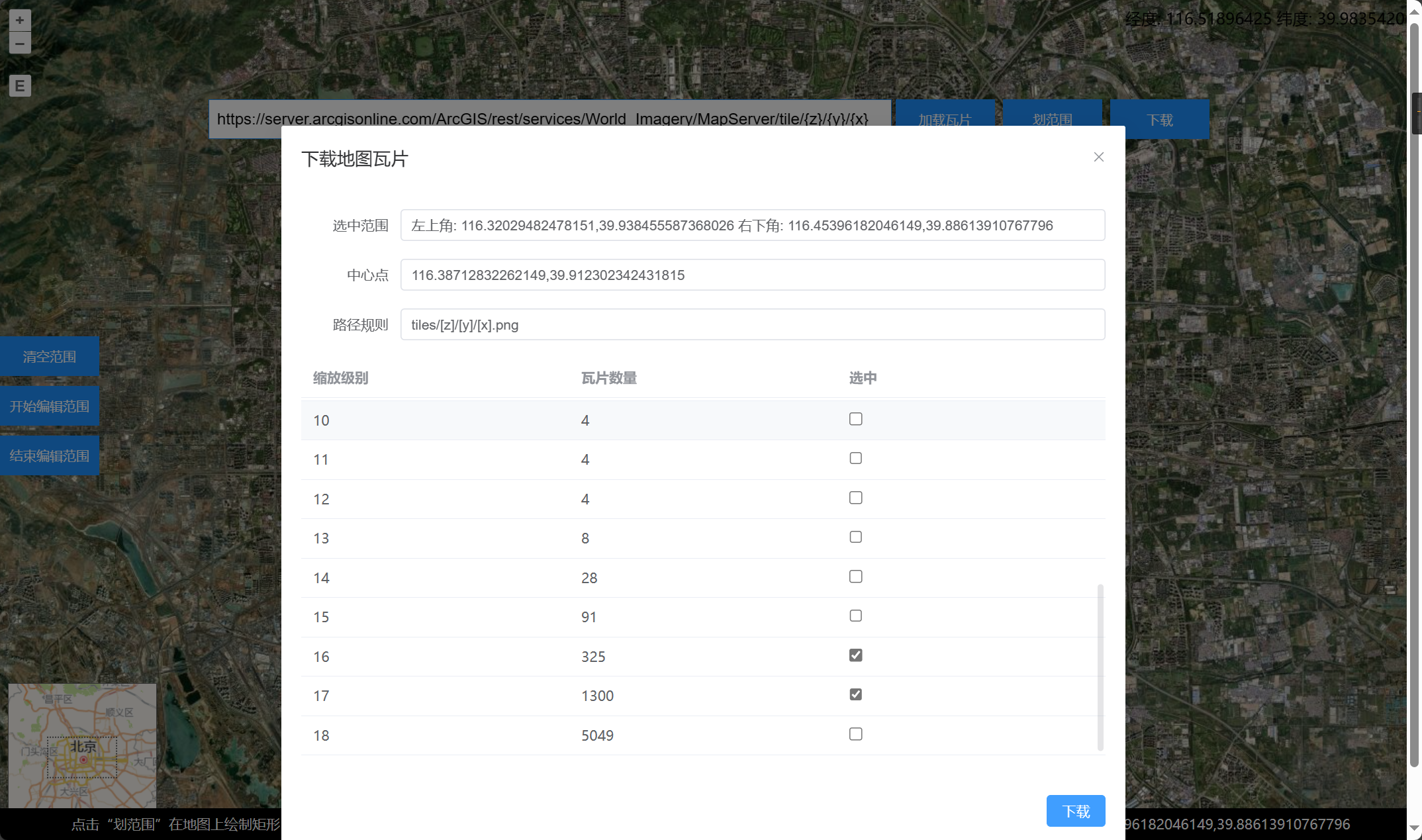
点击“下载”,打开下载信息界面,勾选需要下载的级别

image-20240430131556040

点击下载,弹出信息提示框

image-20240430131619333

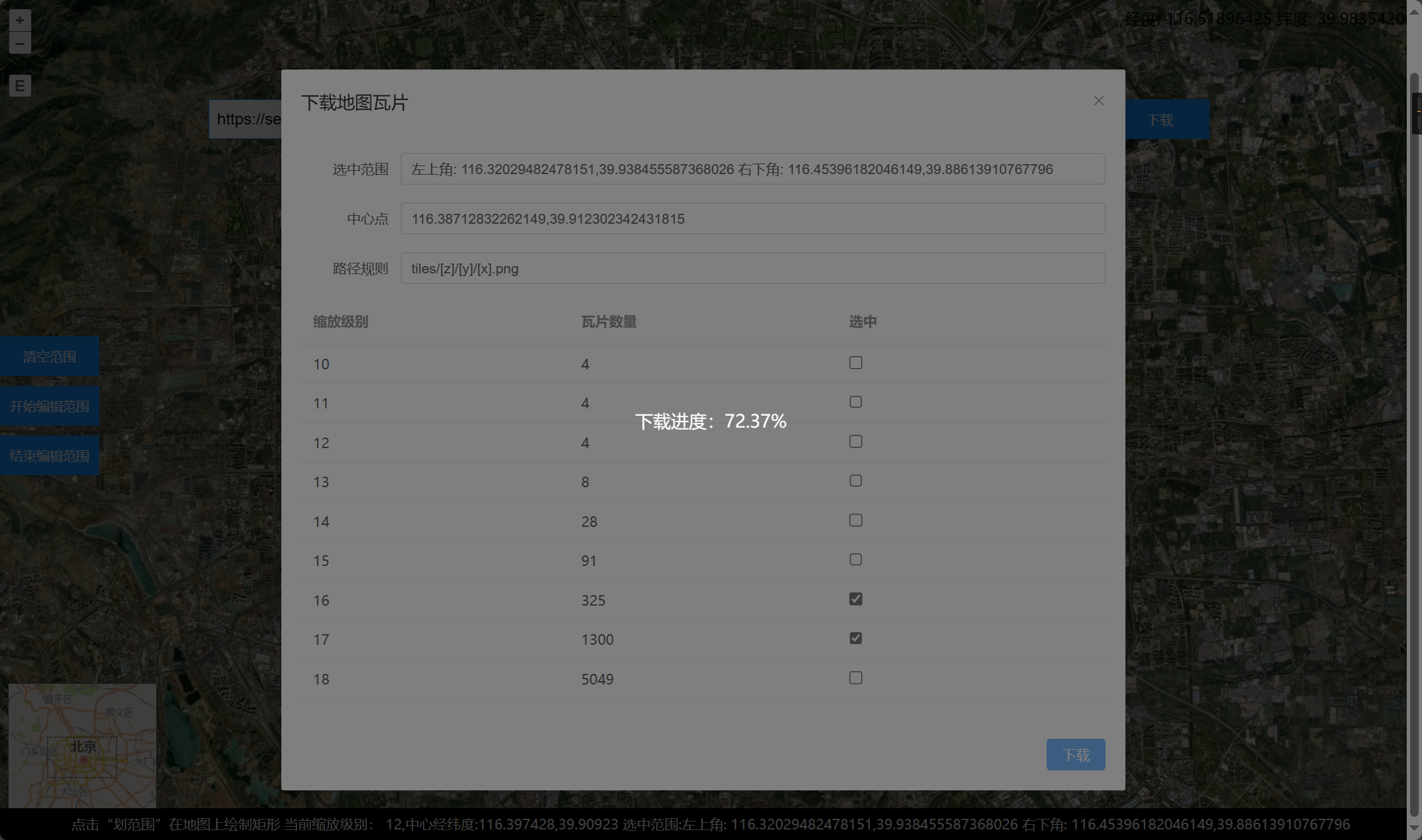
开始下载,等待下载完成

image-20240430131659188

下载完成,打开压缩包查看瓦片

image-20240430131732990

核心代码

项目统一使用 EPSG:4326 地理坐标瓦片,缩放级别为 0~18。

function lon2tile(lon, zoom) {
  return Math.floor((lon + 180) / 360 * Math.pow(2, zoom));
}

function lat2tile(lat, zoom) {
  return Math.floor((1 - Math.log(
    Math.tan(lat * Math.PI / 180) + 1 / Math.cos(lat * Math.PI / 180)
  ) / Math.PI) / 2 * Math.pow(2, zoom));
}

function download() {
  const latlngMin = [rect.value[0], rect.value[3]];
  const latlngMax = [rect.value[2], rect.value[1]];

  const list = [];
  for (let z = 0; z <= 18; z++) {
    const xMin = lon2tile(latlngMin[0], z);
    const yMin = lat2tile(latlngMin[1], z);
    const xMax = lon2tile(latlngMax[0], z);
    const yMax = lat2tile(latlngMax[1], z);

    if (zoomMap.value[z]) {
      for (let x = xMin; x <= xMax; x++) {
        for (let y = yMin; y <= yMax; y++) {
          list.push({ x, y, z });
        }
      }
    }
  }
  downloadTiles(list);
}

async function downloadTiles(list) {
  isLoading.value = true;
  const total = list.length;
  let count = 0;
  let zip = new JSZip();
  for (let i = 0; i < list.length; i += 6) {
    let promises = [];
    if (i + 6 > list.length) {
      promises = list.slice(i, list.length).map(async (item) => {
        const blob = await downloadTile(item.x, item.y, item.z)
        zip.file(`${item.z}/${item.y}/${item.x}.png`, blob);
        count++;
        process.value = ((count / total) * 100).toFixed(2);
      });
    } else {
      promises = list.slice(i, i + 6).map(async (item) => {
        const blob = await downloadTile(item.x, item.y, item.z)
        zip.file(`${item.z}/${item.y}/${item.x}.png`, blob);
        count++;
        process.value = ((count / total) * 100).toFixed(2);
      });
    }
    await Promise.all(promises);
  }
}

function downloadTile(x, y, z) {
  return new Promise((resolve, reject) => {
    fetch(url.value.replace('{x}', x).replace('{y}', y).replace('{z}', z))
      .then((res) => res.blob())
      .then((blob) => {
        resolve(blob);
      })
      .catch((err) => {
        reject(err);
      });
  });
}

网站部署

使用GitHub Actions和GitHub Pages进行打包部署此Vue3项目

具体的步骤可参考:使用GitHub Actions和GitHub pages实现前端项目的自动打包部署 - 当时明月在曾照彩云归 - 博客园 (cnblogs.com)

此项目的GitHub地址为:zhnny/online-map-download: 在线下载XYZ地图瓦片 (github.com)

此项目的在线地址为:在线瓦片地图下载

edit | blame | history | raw
MIT License

Copyright (c) 2024 zhnny

Permission is hereby granted, free of charge, to any person obtaining a copy
of this software and associated documentation files (the "Software"), to deal
in the Software without restriction, including without limitation the rights
to use, copy, modify, merge, publish, distribute, sublicense, and/or sell
copies of the Software, and to permit persons to whom the Software is
furnished to do so, subject to the following conditions:

The above copyright notice and this permission notice shall be included in all
copies or substantial portions of the Software.

THE SOFTWARE IS PROVIDED "AS IS", WITHOUT WARRANTY OF ANY KIND, EXPRESS OR
IMPLIED, INCLUDING BUT NOT LIMITED TO THE WARRANTIES OF MERCHANTABILITY,
FITNESS FOR A PARTICULAR PURPOSE AND NONINFRINGEMENT. IN NO EVENT SHALL THE
AUTHORS OR COPYRIGHT HOLDERS BE LIABLE FOR ANY CLAIM, DAMAGES OR OTHER
LIABILITY, WHETHER IN AN ACTION OF CONTRACT, TORT OR OTHERWISE, ARISING FROM,
OUT OF OR IN CONNECTION WITH THE SOFTWARE OR THE USE OR OTHER DEALINGS IN THE
SOFTWARE.
README 4 KB